
WATCH FEATURES
Yes, for some tasks, but the answer depends on what you mean by without an iPhone. Setting up a watch is a different question from leaving a paired phone at home. The watch model, connection, app, account, and intended task determine what you can do.
Before changing your everyday setup, separate three decisions: how the watch is configured, how it connects when you are out, and how you intend to carry it. A handheld case changes the last of those, not all three.
RePodCase Editorial / Documentation reviewed September 6, 2026. This guide is not a hands-on test of every watch or case.
Setup Without an iPhone Is Not the Same as Leaving It Behind.
If you mean a family member using a watch without owning an iPhone, Apple’s family setup is a separate path. It still uses an organizer’s iPhone and requires an eligible watch and setup. Availability and supported features have regional and account conditions.
If you already have a configured watch, your question is simpler: what works when its paired phone is not beside you? Decide which apps or tasks matter, then check their individual connection requirements.
Do not buy a used watch or an accessory on the assumption that a family setup article means every watch can be activated without access to an iPhone. Check the current requirements for your model and software first.
Source: Apple’s Family Setup Guide
What Changes With GPS, Wi-Fi, and Cellular?
A GPS-only watch cannot acquire cellular capability from a case. Cellular use requires a cellular-capable model and eligible service. Carrier, region, and account conditions matter, so confirm the actual plan you can activate rather than just the hardware name.
| Situation | What to check |
|---|---|
| Paired phone nearby | The apps and connection you normally use |
| Known Wi-Fi available | The feature’s requirements for that network |
| Cellular service active | Model, plan eligibility, coverage, and app support |
| No phone or network connection | Which tasks were prepared to work offline |
Source: Set Up Cellular on Apple Watch
Check the Feature You Care About.
Apple lists downloaded audio, timekeeping tools, and supported Apple Pay use among tasks available without a phone or network connection. Streaming and connected communication require the appropriate setup. For cellular watches, SMS/MMS and some third-party notifications can still depend on the paired iPhone being powered on and online elsewhere.
| Your priority | Your pre-trip check |
|---|---|
| Music or podcasts | Confirm whether your chosen audio is actually downloaded or needs streaming |
| Calls or messages | Check the exact service, connection, and paired-phone requirements |
| Timers | Open the timer you intend to use and check the alert in your setup |
| Maps | Check the route and connection or offline requirements in your chosen app |
| Wallet | Confirm card, region, setup, and the payment workflow you will use |
| Workout or safety features | Check the wearing conditions and feature-specific requirements, not just connectivity |
Treat this as a preparation list, not a guarantee that every feature works on every watch. Apple publishes the detailed current limits by function and model.
Source: Use Apple Watch Without iPhone Nearby
Away From Your Phone Is Not the Same as Off Your Wrist.
Apple explains that wrist detection can affect locking and workout behavior. Turning it off also removes or changes features, including automatic locking and certain tracking and safety functions. Do not disable it as a blanket shortcut to make an accessory easier to use.
Source: Apple’s Wrist Detection Guidance
Set Up the Watch Before the Moment You Need It.
Write down the few tasks you actually want: a particular playlist, a contact method, a route, or a timer. Open each one in the connection and carrying setup you expect to use. A visible app icon is not evidence that the task is ready offline.
Can You Listen to Music on Apple Watch Without Your Phone?
Yes: supported music can stream over Wi-Fi or cellular, or play from downloads saved on the watch. A GPS-only model does not gain cellular service from a case. Your music app and account determine the available options; offline playback needs a completed download, not just an item in your library.
For a service-by-service decision, use our guide to music on Apple Watch without your phone to separate downloaded playback from Wi-Fi or cellular streaming before choosing a setup.
Source: Apple: using your watch without iPhone nearby.
Want to Download Music for Offline Listening?
Adding music to a library and downloading it to the watch are separate steps. Use the dedicated guide to add a playlist, confirm that it is stored locally, connect headphones, and test playback before leaving the paired phone behind.
Follow the complete Apple Watch offline music guide.
Connect AirPods to Apple Watch.
AirPods already set up with your paired iPhone are ready to use with the watch. For another Bluetooth headset, put it in discovery mode, open Settings on the watch, choose Bluetooth, and select the headset when it appears. Check where the audio is playing before you leave.
Source: Apple: connect headphones or speakers.
Keep a backup for communication and navigation until you understand the setup. Check the watch’s charge and condition, and choose an ordinary, low-pressure outing before relying on a new arrangement for something important.
Source: Add Music to Apple Watch
Good Moments for a Smaller Setup.
A short walk, a break between sets, or a focused hour at a desk can be a useful place to start. Pick the few interactions you want to keep rather than asking a small screen to reproduce your entire phone routine.
You do not have to leave your phone behind to make a smaller interaction useful. It may be enough to leave it in a bag while you use a prepared watch task. Keep the fuller setup when the activity, connection, or safety requirements call for it.
A Different Way to Carry the Watch You Have Set Up.
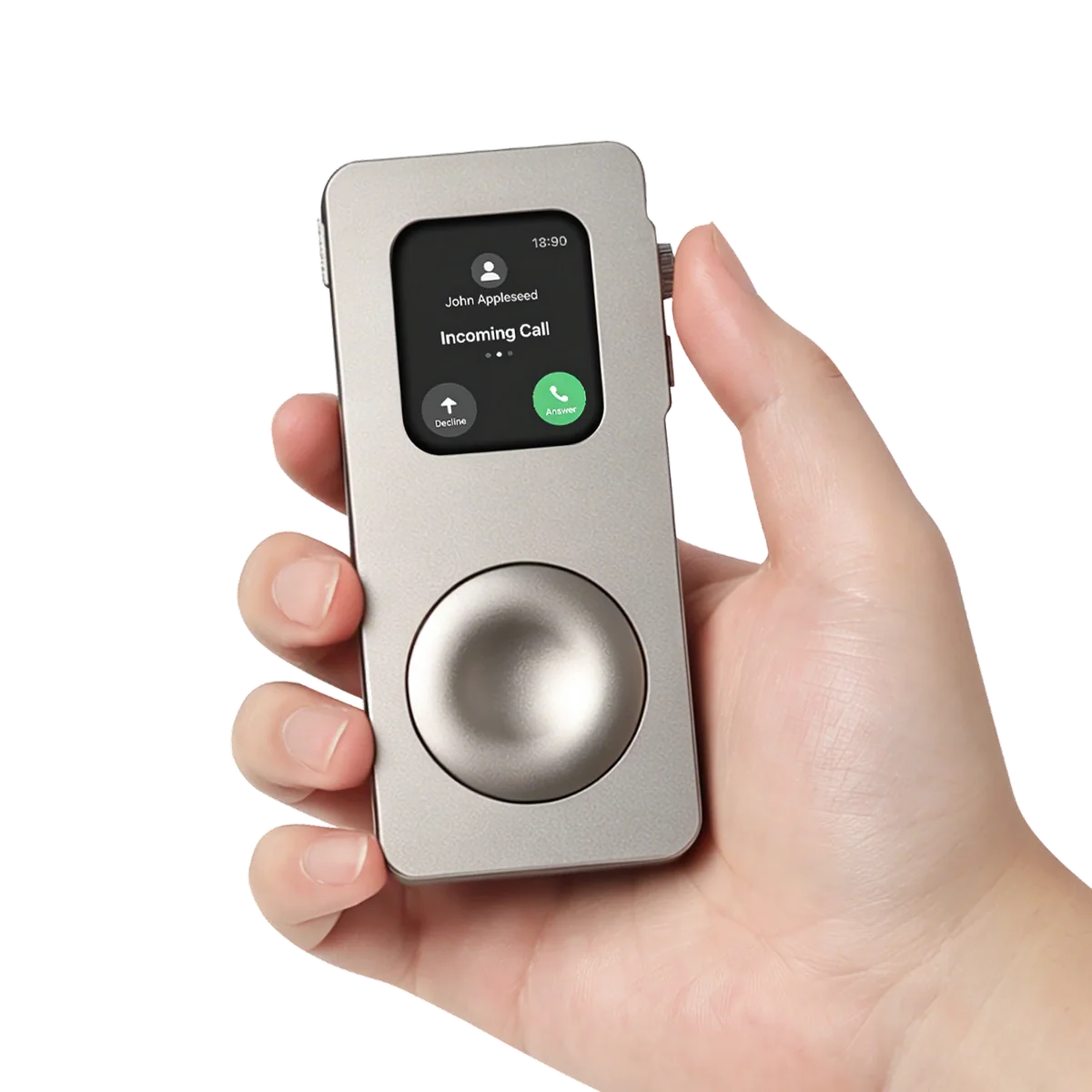
RePodCase does not make Apple Watch independent. It gives a compatible, already configured watch a handheld or pocket-ready form for the moments where its supported features are enough.
Check the model and size match before choosing a case. Then review the fitting and off-wrist experience, not only the appearance.
Common Questions About Using Apple Watch Without a Phone.
Do I need cellular for every task?
No. It depends on the task and available connection. Use the checklist above and Apple’s current feature guide instead of assuming that all useful tasks require a plan.
Is phone-light the same as never needing an iPhone?
No. The phrase describes a way of using less of the larger screen during parts of your day. It does not remove setup, account, management, or connectivity requirements.
Will an iPod-style case solve a connection problem?
No. A physical case does not add a radio, data plan, or software support. Resolve the watch and service issue separately.
Can I assume a handheld watch behaves exactly like a worn one?
No. Check the off-wrist considerations above and the actual case fitting before relying on that setup.
What should I check before buying a case?
First, make sure the watch already does the tasks you need. Then confirm the exact case fit, review its installation method, and decide whether that physical form suits your routine.